By Christina Sloane — Updated Mar 24, 2022
While several vendors offer “personalized” stars for naming purposes, these stars are not part of any official astronomical catalog. However, the certificates you receive come with a finding chart that lists the star’s right ascension (RA) and declination (Dec). By entering these coordinates into reputable online databases, you can pinpoint the exact location of your star in the night sky.
Navigate to the NASA SkyView virtual observatory. Select the “Non‑Astronomers” query form to begin.
Consult your finding chart. You’ll find two numbers: the right ascension (RA) and the declination (Dec). Remove any company‑specific letters that may be appended to these numbers.
Type the cleaned RA and Dec values into the “Coordinates or Source” text box, separating them with a comma.
Under “SkyView Surveys,” click the “DSS” (Digitized Sky Survey) option.
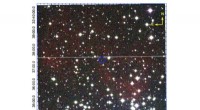
Press “Submit Request.” A view of the star’s field will appear. You can print this image for future reference.
Visit the Heavens‑Above website, recommended by astronomers at Cornell University.
Click “From Database” under the “Configuration” heading and enter your town and country. The site will redirect you to the main page.
Under the “Astronomy” menu, select “Whole Sky Chart.” This displays the constellations and prominent stars visible from your location.
Refer to your finding chart to confirm whether the displayed constellations contain your star. If not, adjust the date/time filter to a different month or year until the star’s position aligns.
Save or print the sky chart that includes your star for easy reference.
When your star is predicted to be visible, bring the printed charts outside. Use them to guide your observation of the star’s precise location in the sky.
With these steps, you can confidently locate and celebrate your personalized star, ensuring it is visible to you whenever the celestial conditions allow.